
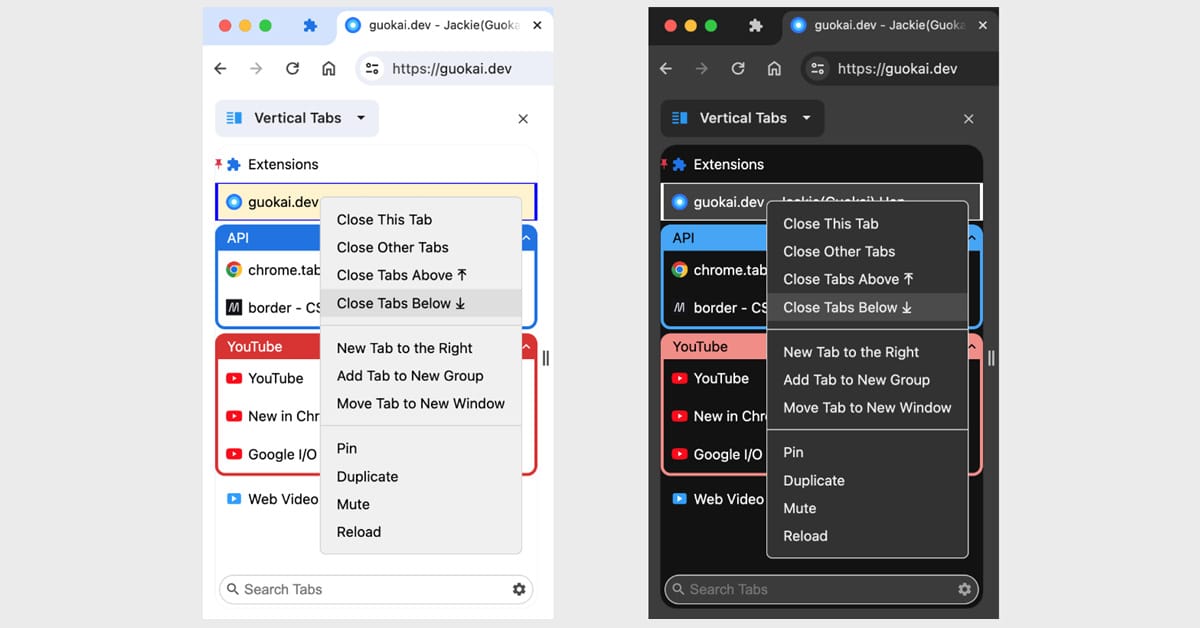
California: Google Chrome is finally adding vertical tabs, a feature long requested by power users. The change moves the traditional tab bar from the top to the side of the browser window.
Now, users can right‑click any Chrome window and select “Show Tabs Vertically” to enable the sidebar. The tabs stay in that format until changed back. This feature is not new in concept. Google has tested vertical tabs before, but it never made it to the final version until now.
Vertical tabs let users see full page titles and better manage large groups of tabs. This is especially helpful for people who keep many tabs open at once. Besides, there is no hard limit on the number of tabs users can open, aside from hardware restrictions. Chrome treats vertical tabs the same as horizontal ones.
Also read: Microsoft Embeds AI Across Edge Browser on Desktop, Mobile
Alongside vertical tabs, Chrome is also launching a refreshed Reading Mode. This mode offers a full‑page, distraction‑free view of articles, and cleans up ads and extra clutter.
Users can enter Reading Mode by right‑clicking and choosing “Open in reading mode”. It helps people focus on text and read without distractions.
These updates reflect growing competition with new browsers like Arc, Dia, and others putting tabs in a sidebar and giving users more workspace control. In recent months, in fact, Google Chrome has been busy with other updates as well, adding features like Gemini AI integration, autofill improvements, and Split View mode. Google has also sped up its release schedule, now updating Chrome every 2 weeks.
Chrome version 146 includes both vertical tabs and the enhanced Reading Mode. Users should receive these updates through usual Chrome auto‑updates.
The company says the vertical tabs feature will roll out gradually to all users, starting today. It will become the default for users who enable it. This move will mostly benefit people who manage many tabs, including researchers, students, or multitaskers.
With these updates, Google aims to improve productivity and keep Chrome user-friendly amid rising competition. These changes also give users fewer reasons to switch browsers. Chrome’s new features, all in all, bring better organization and reader comfort, showing that Google is responding to direct feedback from power users.

 Previous


